
Changing the refresh rate
What does refresh rate mean?
- A refresh rate is the number of times your monitor updates with new images each second. For example, a 60 Hz refresh rate means the display updates 60 times per second. A higher refresh rate results in a smoother picture.
Usually, a refresh rate (frames per second) of 59Hz or 60Hz is more than enough to operate a computer. However, if you're noticing screen flickering, or if you have monitors that support a higher refresh rate, bumping the settings can provide a better and smoother viewing experience — especially for gamers.
To adjust the refresh rate of a monitor, use these steps:
- Open Settings.
- Click on System.
- Click on Display.
-
Click the Advanced display settings option.

-
Click the Display adapter properties option for the display you want to change the refresh rate.

- Click the Monitor tab.
-
Under the "Monitor Settings" section, use the drop-down menu to set the correct refresh rate.
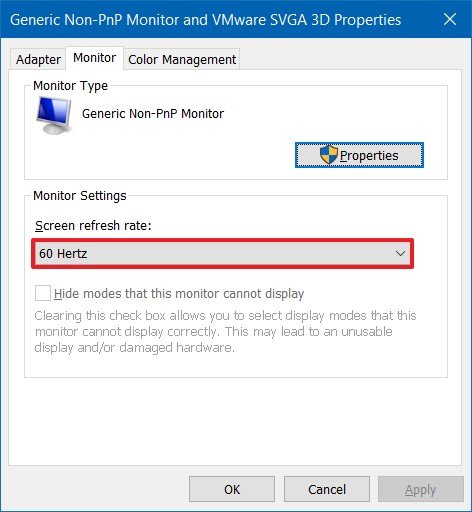 Source: Windows Central


After you complete the steps, you may need to repeat steps No. 5, 6, and 7 to change the refresh rate on the remaining monitors.
Comments
0 comments
Please sign in to leave a comment.