Checking for Play on Axles
Estimated Time: 1 minute Difficulty: Easy
|
Follow the steps in this article to determine if you need to square the X/Y axes of your printer.
Checking for play on the Axles
1) Preface
Over time the pulleys on the X and Y axles may work loose. This will cause play on the axle which will lead to loss of print quality. It is quick to check for this condition, and should be checked monthly.
2) Check for Play
- Move the print head to the back-left corner of the machine.
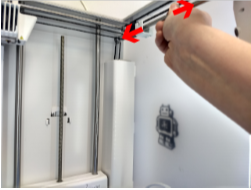
- Grasp the right X axle with one hand and hold the case of the machine with your other hand.
- Attempt to move the axle forwards and backwards along the length of the axle (axially).
- It should not move at all.
- If you see or feel the axle move, or hear the pulley tapping against the case of the machine you will need to move on to How do I square the X/Y Axes? [LINK].
- Repeat this test on the left X axle as well as both Y axles.
|

Comments
0 comments
Please sign in to leave a comment.