
Learn all about Excel's lookup & reference functions, such as VLOOKUP, HLOOKUP, MATCH, INDEX and CHOOSE.
Vlookup
The VLOOKUP (Vertical lookup) function looks for a value in the leftmost column of a table, and then returns a value in the same row from another column you specify.
1. Insert the VLOOKUP function shown below.

2. Drag the VLOOKUP function in cell B2 down to cell B11.
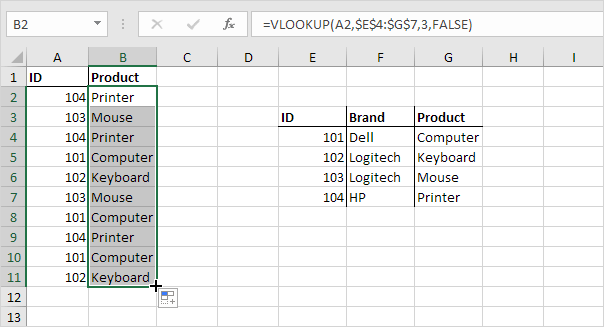
Note: when we drag the VLOOKUP function down, the absolute reference ($E$4:$G$7) stays the same, while the relative reference (A2) changes to A3, A4, A5, etc. Visit our page about the VLOOKUP function for much more information and many examples.
Hlookup
In a similar way, you can use the HLOOKUP (Horizontal lookup) function.

Match
The MATCH function returns the position of a value in a given range.

Explanation: Yellow found at position 3 in the range E4:E7. The third argument is optional. Set this argument to 0 to return the position of the value that is exactly equal to lookup_value (A2) or a #N/A error if not found. Use INDEX and MATCH in Excel and impress your boss.
Index
The INDEX function below returns a specific value in a two-dimensional range.
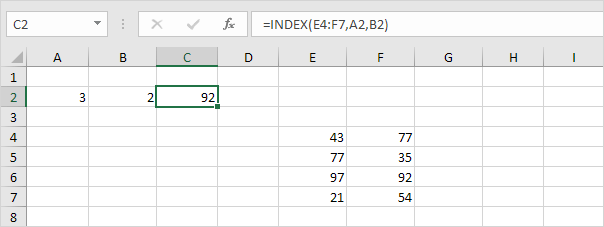
Explanation: 92 found at the intersection of row 3 and column 2 in the range E4:F7.
The INDEX function below returns a specific value in a one-dimensional range.
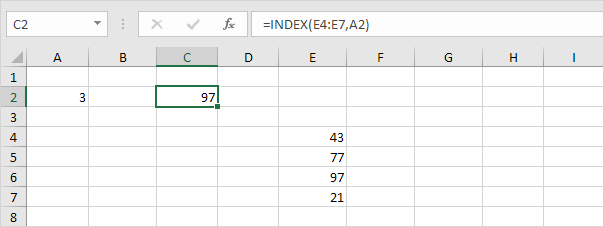
Explanation: 97 found at position 3 in the range E4:E7. Use INDEX and MATCH in Excel and impress your boss.
Choose
The CHOOSE function returns a value from a list of values, based on a position number.

Explanation: Boat found at position 3.
Comments
0 comments
Please sign in to leave a comment.